
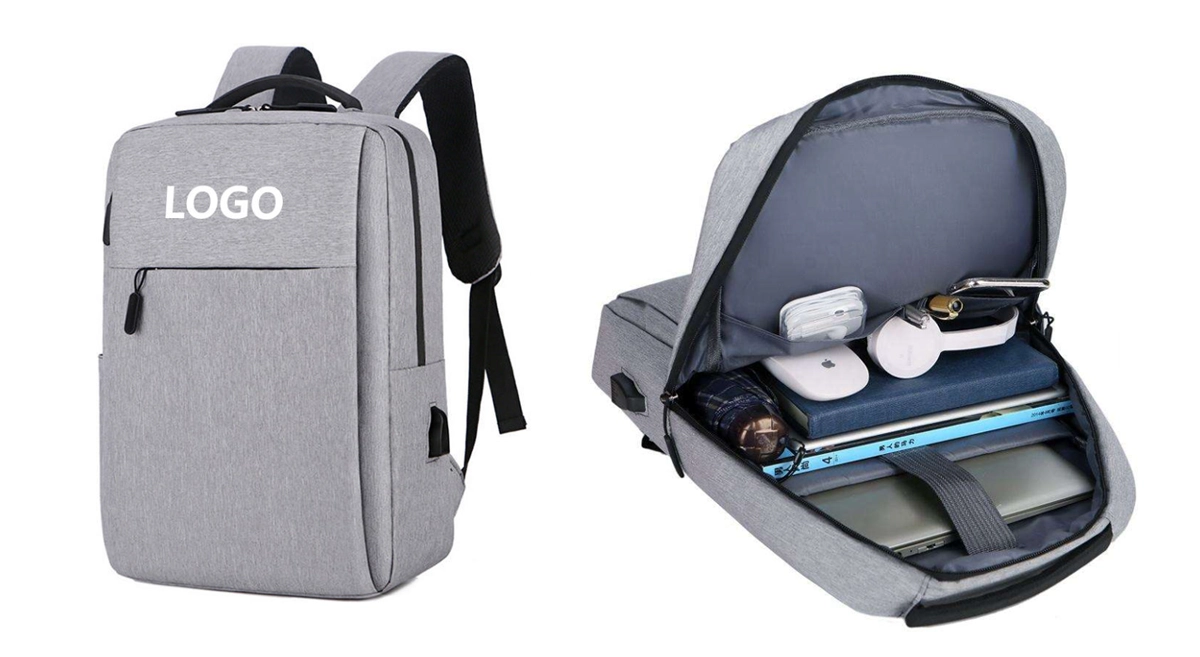
You may ask what is a laptop backpack and why you need it. A laptop backpack keeps your laptop safe when you travel, go to school, or go to work. It prevents your laptop from getting bumped or scratched. Additionally, it provides space for your charger, mouse, and books. Comfort is important, too, as wide straps help you carry it easily. In the last five years, more people have been interested in what is a laptop backpack.
- Most people who buy them are business workers and students.
- Travelers and individuals who use them for daily life also choose them.
- With more people working from home, the popularity of these backpacks has increased.
- Students are using more tech, leading to a higher demand for them.
A laptop backpack helps you stay neat, comfy, and ready for your day.
Key Takeaways
- A laptop backpack keeps your device safe from bumps and scratches when you travel, go to school, or work.
- You should look for padded compartments and strong materials so your laptop stays safe.
- Pick a backpack with many compartments to help you organize your tech gear and accessories.
- Comfort is important, so choose a backpack with padded straps you can adjust to make your shoulders hurt less.
- Water-resistant materials help keep your laptop dry if there are spills or light rain.
- Think about security features like anti-theft zippers and RFID protection to keep your things safe.
- Look at what you need every day to find the right size and style of laptop backpack for your life.
- Set a budget to help you choose a backpack that looks good and works well.
What Is a Laptop Backpack
You might wonder, what is a laptop backpack and why do so many people use one? A laptop backpack is a special kind of bag made just for carrying your laptop and other tech gear. Its main purpose is to keep your laptop safe and make it easy for you to carry everything you need for school, work, or travel. When you ask what is a laptop backpack, you are really asking about a bag that puts protection, organization, and comfort first.
Unique Design
The unique design of a laptop backpack sets it apart from other bags. You will notice that it always has a padded section just for your laptop. This section keeps your device safe from bumps and scratches. Most laptop backpacks use strong materials like leather or cotton. They also have extra pockets for things like chargers, power banks, and hard drives.
Here’s a quick look at some of the most common features you will find in a laptop backpack:
| Feature | Description |
|---|---|
| False Bottom & Soft Lining | Lifts laptops above the ground for impact protection. |
| Adjustable Padded Shoulder Straps | Spreads weight evenly for long wear. |
| Water Resistant Materials | Protects contents from light rain. |
| Multiple Compartments | Holds documents, tablets, and work essentials. |
| Security Options | Hidden zippers and lockable compartments. |
These features make a laptop backpack much more than just a regular bag. You get peace of mind knowing your laptop is safe. You also get organized storage for all your accessories. When you choose a laptop backpack, you pick a bag that fits your busy life and protects your tech.
Comparison to Regular Backpacks
Now, let’s talk about how a laptop backpack is different from a regular backpack. You may think all backpacks are the same, but that’s not true. When you look closely, you will see some big differences.
- Laptop backpacks have padded compartments made just for laptops.
- They use impact-absorbing materials to protect your device from drops and bumps.
- You will find special pockets for chargers, cables, and documents. Regular backpacks often do not have these.
- The features in a laptop backpack focus on keeping your tech safe and organized.
If you ask what is a laptop backpack, remember that it is not just any bag. It is a smart choice for anyone who carries a laptop every day. The features you get—like extra padding, water resistance, and special pockets—make your life easier and your laptop safer. So, when you pick a laptop backpack, you are choosing a bag designed for your needs.
Tip: Always check the features before you buy a laptop backpack. Make sure it has the right size and enough protection for your device.
When you understand what is a laptop backpack, you can see why so many people prefer it over a regular backpack. The unique design and special features help you stay organized, comfortable, and ready for anything.
Protection Features
When you choose a laptop backpack, you want your device safe. Let’s see which protection features are most important.
Padded Laptop Compartment
The padded laptop compartment is the main part that keeps your laptop safe. This special spot holds your laptop tight and protects it from bumps. Inside, there are different materials that help stop damage. These materials soak up shock and keep your laptop from getting hurt. Check out this table to learn what makes a good padded laptop compartment:
| Material Type | Properties/Benefits |
|---|---|
| EVA Foam (3–6 mm) | Excellent shock absorption, holds shape well |
| EPE Foam | Lightweight, flexible, slightly softer than EVA |
| PE Foam | Highly compressible, provides soft cushioning |
| Air Mesh + Foam | Adds breathability, used in back panels and straps |
| Corner Reinforcement | EVA blocks, rubber bumpers, double padding layers |
| Lining Options | Tricot, velvet, micro-fleece, brushed polyester, Nylex |
| Reinforcement | EVA or PP boards, nylon webbing, padding stiffeners |
| Outer Fabrics | Ballistic nylon, high-density polyester, TPU-laminated |
Impact Protection
Sometimes your backpack might fall or get hit. The padded compartment works like a shield for your laptop. It takes in the force from drops and keeps your laptop safe. Things like padded sleeves and strong bags help stop damage if you drop your bag. You can feel calm knowing your laptop has a strong layer to block accidents.
Scratch Prevention
Scratches can make your laptop look bad or even cause problems. Soft linings like velvet or micro-fleece inside the compartment help stop scratches. These soft materials keep your laptop smooth and clean. You do not have to worry about keys or pens scratching your laptop.
Separate Padded Sleeve
Some backpacks have a separate padded sleeve for your laptop. This sleeve gives extra safety and more ways to use it. You can take your laptop out fast or use the sleeve by itself. If you travel a lot, you will like this feature. It helps you move through airport security faster.
Tip: Always check if the backpack has a sleeve you can remove. This gives you more safety and makes things easier.
Water-Resistant Materials
Water can really hurt your laptop. Most laptop backpacks use water-resistant fabric to keep your device dry. Here are some things you should know:
- Most backpacks called water-resistant are not fully waterproof, especially at Level 2.
- Level 2 backpacks might leak at the seams in heavy rain.
- For better safety, look for backpacks made for higher waterproof levels.
- 210D nylon can leak and show water spots.
- 420D nylon keeps the inside dry but may show marks.
- 600D polyester stays dry but takes longer to dry out.
- 1000D nylon stays dry and keeps its shape, but it is heavier.
- Many backpacks only stop splashes, not full water, which can confuse people.
You should always read the label and test the fabric if you can. Water-resistant materials help keep your laptop safe from spills and light rain, but they may not work in heavy rain.
Capacity and Organization
When you choose a laptop backpack, you want your things neat. It is important to find items quickly. You carry your laptop, charger, mouse, and notebook. If your backpack is organized, you will not waste time looking for stuff.
Multiple Compartments
A good laptop backpack has many compartments. Each compartment has its own use. Put your laptop in the padded section. Use other pockets for your phone, pens, or snacks. This setup helps you stay organized and ready.
Device Pockets
Device pockets are made for your gadgets. Slide your tablet, phone, or power bank inside. These pockets keep devices safe and away from other things. Your phone will not get scratched by keys. You can grab your tablet fast when you need it.
Accessory Storage
Accessory storage gives space for chargers, cables, and headphones. Use mesh pockets or zippered sections for small items. These spots stop things from getting lost at the bottom. You can find your charger quickly when your battery is low.
Tip: Put one type of item in each pocket. You will always know where your things are.
Here is a table that shows how these features help you stay organized:
| Benefit | Description |
|---|---|
| Multiple Compartments | Many pockets help organize your things. You can find devices and papers easily. |
| Organizational Pockets | Special spots for chargers and papers keep items neat. |
| Laptop Protection | Soft sections protect laptops from bumps and scratches. |
| Efficiency in Design | Good organization saves time and stops clutter. You do not have to dig through your bag. |
Easy Access Design
Easy access design makes your day easier. You can open your backpack and reach your laptop or charger fast. Some backpacks have side zippers or top openings. You can grab your things in seconds. This helps you stay on time at school or work.
You will see the difference when you travel. You can take out your laptop at airport security quickly. Keep your passport or tickets in a front pocket. You do not have to worry about missing something important.
A backpack with good capacity and organization helps every day. You save time, keep your things safe, and feel ready for anything. You do not have to deal with clutter or lost items. You get more done and feel less stressed.
Note: Smart organization in your backpack means you spend less time searching and more time doing what matters.
Comfort and Ergonomics
You want your laptop backpack to feel good every time you wear it. Comfort matters, especially when you carry your bag all day. Let’s look at the features that help you stay comfortable and healthy.
Adjustable Wide Padded Straps
Wide padded straps make a big difference. When you put on your backpack, these straps spread the weight across your shoulders. You feel less pressure, even if your bag is heavy. You can adjust the straps to fit your body. This helps you avoid sore shoulders and keeps your posture straight.
Many backpacks use thick foam in the straps. You notice the softness right away. If you walk to school or work, your shoulders stay comfortable. You do not have to worry about red marks or pain. Some backpacks also have chest or waist straps. These extra straps help balance the load and keep your bag steady.
Tip: Always use both shoulder straps. This keeps your back straight and stops you from leaning to one side.
Breathable Back Panel
A breathable back panel keeps you cool. When you wear your backpack for a long time, you might get sweaty. Thick pads behind your lower back and shoulders lift the pack off your skin. This lets air flow between your back and the bag. You stay dry and comfortable, even on hot days.
Here’s how a breathable back panel helps you:
- Breathable mesh lets air move freely.
- You sweat less and feel fresh.
- Your back stays at a comfortable temperature.
- The pack feels lighter because it does not stick to your skin.
Some backpacks use special mesh and foam to make the back panel. You can see the difference when you carry your bag for hours. Your shirt stays dry, and you do not feel sticky.
| Backpack Model | Breathable Back Panel | Comfort Level |
|---|---|---|
| Osprey Stratos 34 | Yes | High |
| Gregory Citro 24 H2O | Yes | High |
| Gregory Zulu 24 | Yes | High |
You get more comfort when you choose a backpack with a good back panel. You can walk, bike, or travel without feeling hot or tired.
Ergonomic Fit
An ergonomic fit means your backpack matches your body shape. You feel less strain and avoid injury. Backpacks with ergonomic design use wide, padded straps and sometimes waist belts. These features help spread the weight and support your spine.
You want your backpack to sit high on your back, not hang low. This keeps your posture neutral and stops you from getting tired. Using both straps helps you stand tall and move easily. You do not have to worry about back pain or sore muscles.
Studies show that ergonomic backpacks protect your spine and keep you comfortable. You can carry your laptop and books every day without hurting your body. Good design turns a heavy load into something easy to manage.
Note: Pick a backpack that fits your body. Try it on and adjust the straps until it feels right.
You deserve a backpack that feels good and keeps you healthy. Comfort and ergonomics help you enjoy your day, no matter where you go.
Durability and Materials
When you choose a laptop backpack, you want it to last a long time. You do not want your bag to tear or break quickly. Durability is important because you carry your laptop and other things every day. Let’s see what makes a backpack strong and dependable.
Strong Fabrics
The fabric of your backpack shows how tough it is. Some materials can handle rough use, but others wear out fast. You need a fabric that can take rain, sun, and heavy stuff. Here’s a table that lists the strongest fabrics used in laptop backpacks and how they compare:
| Fabric | Durability Characteristics | Longevity Comparison |
|---|---|---|
| Nylon | Strong, lightweight, water-resistant, ideal for outdoor use | High durability, suitable for tough conditions |
| Polyester | Affordable, UV resistant, slightly less durable than nylon | Good longevity for casual use |
| Canvas | Heavy-duty, excellent abrasion resistance, rugged look | Durable but heavier, suitable for vintage style |
| Cordura | Exceptional toughness, resists abrasions, scuffs, and tears | Very high durability for heavy-duty use |
| Kevlar | Extreme strength, cut resistance, heavier and more expensive | Maximum protection, ideal for tactical use |
| Dyneema | Ultra-strong, lightweight, exceptional tensile strength, water-resistant | Excellent longevity for high-performance gear |
If you need a backpack for school or work, nylon or polyester is a good choice. For outdoor trips or heavy use, Cordura or Dyneema is stronger. Kevlar is best for the most protection, but it costs more.
Tip: Pick a fabric that fits your daily life. If you travel often or carry heavy things, choose a tougher material.
Reinforced Stitching
Stitching keeps your backpack together. Weak stitching can make your bag fall apart, especially at the straps or bottom. Reinforced stitching uses two or three threads in important spots. This makes the seams stronger and helps your backpack last longer. Here’s a table that shows how reinforced stitching helps:
| Benefit | Description |
|---|---|
| Increased Strength | Double or triple stitching at stress points helps distribute tension evenly. |
| Longevity | Reinforced seams prevent tears and wear, especially in high-pressure areas. |
| Structural Integrity | Maintains the backpack’s shape and function under heavy use. |
You should check the stitching before you buy. Look for thick threads and extra stitches where the straps connect. This keeps your backpack strong, even if you carry heavy books or a laptop every day.
Note: Reinforced stitching lets your backpack hold more weight and last longer.
Quality Zippers
Zippers are more important than you might think. A broken zipper can ruin your day. You want zippers that open and close easily and do not get stuck. Here are the best types of zippers for laptop backpacks:
- Coil Zippers: These are flexible and strong. They work well for backpacks and do not jam much.
- Molded Plastic Zippers: These are tough and strong. Sometimes they jam or break on curves.
- Metal Zippers: These are common in clothes. They break or jam more and are not the best for backpacks.
If you want your backpack to last, pick one with coil or molded plastic zippers. These keep your bag safe and make it easy to get your laptop.
Tip: Try the zippers before you buy. Make sure they move easily and feel strong.
A strong backpack needs tough fabric, good stitching, and quality zippers. When you pick a backpack with these features, you get a bag that lasts and keeps your laptop safe.
Security and Travel Features
Anti-Theft Zippers
You want your laptop backpack to keep your things safe. This is very important in crowded places. Anti-theft zippers are a top security feature to look for. These zippers make it hard for someone to open your bag without you seeing. You feel calm when you know your stuff is protected.
Here are some anti-theft zipper types you might see:
- Locking zippers let you use a small padlock. Thieves cannot open your bag fast.
- Zipper pulls with clips attach to hooks or loops. This makes it hard for someone to unzip your bag quickly.
- Fabric loops cover the zippers and hide them. This slows down anyone trying to get inside.
Some backpacks use slash-proof materials, too. These fabrics have metal wires or carbon fiber inside. Thieves cannot cut through the bag easily. You can walk in busy streets or ride the bus without worry. If you travel a lot, these features help you feel safer.
Tip: Always check if your backpack has locking zippers or hidden zipper pulls. These small things help keep your laptop and other items safe.
RFID Protection
You carry credit cards, passports, and other things with RFID chips. Thieves can use scanners to steal your information without touching you. RFID protection in laptop backpacks blocks these signals and keeps your data safe.
Manufacturers use special fabric inside pockets for this. The fabric stops signals from reaching your cards and passport. You do not have to worry about someone scanning your bag in a busy place. RFID protection is very helpful if you travel or work in crowds.
Here’s a quick look at how RFID protection works:
| Feature | How It Helps You |
|---|---|
| Shielding Fabric | Blocks signals from RFID scanners |
| Secure Pockets | Keeps cards and passports safe |
| Peace of Mind | Protects your identity and money |
You can relax knowing your backpack guards against electronic theft. If you want extra safety, pick a bag with RFID-blocking pockets.
Hidden Pockets
Hidden pockets give you more safety and secret storage. These pockets are usually against the back panel. Only you can reach them when you take off your backpack. Thieves cannot see or get to these pockets while you wear your bag.
You can use hidden pockets for your passport, cards, or cash. Many travelers say these pockets help them feel safer in busy cities. You do not have to worry about someone grabbing your valuables when you move around.
Note: Always use hidden pockets for your most important items. This easy step keeps your valuables out of sight and out of reach.
Hidden pockets are a smart choice for extra protection. You get more control over your things and less stress when you travel. When you use anti-theft zippers, RFID protection, and hidden pockets together, your backpack becomes a strong shield against theft.
Trolley Sleeve
You might see a trolley sleeve on the back of some laptop backpacks. This feature looks like a simple strap or pocket. It lets you slide your backpack over the handle of your rolling suitcase. When you travel, this small detail makes a big difference. You can move through airports or train stations with one hand free. Hold your coffee, show your boarding pass, or check your phone without juggling bags. The trolley sleeve keeps your backpack steady and stops it from falling off while you walk. You do not have to worry about picking up your bag every few steps. Thieves also find it harder to grab your backpack when it is attached to your luggage. You get more security and less stress. If you travel often, you will love how easy and safe this feature makes your journey.
Tip: Always check if your backpack has a trolley sleeve before you buy. It helps you stay organized and keeps your hands free.
Mobile Power Interface (USB Port)
A mobile power interface, or USB port, is a smart feature in many laptop backpacks. You can charge your phone or tablet while you walk. Just connect your power bank inside the backpack and plug your device into the outside port. You do not have to dig through your bag for cables or outlets. This makes life easier when your battery runs low.
Here are some benefits and drawbacks of USB ports in laptop backpacks:
- Advantages:
- You get a convenient USB charging port for easy access to power.
- The padded compartments protect your laptop from bumps.
- Ergonomic design keeps you comfortable all day.
- Multiple pockets help you organize your things.
- You can charge your phone on the go.
- Anti-theft design adds extra security.
- Breathable padding keeps you cool.
- The backpack looks stylish and feels lightweight.
- Strong construction means your bag lasts longer.
- Spacious compartments give you room for books and devices.
- Disadvantages:
- Some backpacks have limited space for larger laptops.
- You might find fewer pockets for accessories.
- New backpacks can have a strong chemical smell at first.
- Weak zippers may cause trouble after heavy use.
Note: If you want to charge your devices while you travel, look for a backpack with a built-in USB port. Always check the size and number of pockets to make sure it fits your needs.
A USB port in your backpack helps you stay connected and ready for anything. You do not have to worry about running out of battery or losing your charger. This feature is perfect for busy students, workers, and travelers.
Choosing Your Laptop Backpack
Assessing Needs
Before you pick a laptop backpack, you need to think about your daily life. What do you do most? Do you go to school, work, or travel a lot? Your answer helps you choose the right backpack. Some people need a full size laptop backpack for big laptops and lots of books. Others want a medium size laptop backpack for lighter loads.
Here are some things to think about when you assess your needs:
- What will you carry every day?
- Do you need space for books, clothes, or just your laptop?
- Do you want a backpack that matches your style?
- Will you walk a lot or ride a bike?
- Do you need water resistance for rainy days?
- How important is comfort for you?
A modern laptop backpack features multiple compartments: tech gear, travel essentials, quick-access pockets, water bottles. Organization is key.
You should also look at the straps and padding. If you carry your backpack for hours, you want it to feel good on your shoulders. Think about how many compartments you need. Some people like lots of pockets for chargers and pens. Others want a simple design.
Laptop Size Compatibility
Getting the right laptop backpack size is very important. Many people only look at the screen size of their laptop. This is not enough. You need to measure the whole laptop, including the width, height, and thickness. If you have a full size laptop backpack, you can fit bigger laptops and more items. A medium size laptop backpack works better for smaller laptops and less gear.
Here’s what you should do:
- Measure your laptop’s width, height, and thickness.
- Check the backpack’s laptop compartment size.
- Make sure your laptop fits snugly, not too tight or too loose.
- Test the fit if you can before you buy.
If you carry a lot of things, you may want a full size laptop backpack. If you only need your laptop and a few extras, a medium size laptop backpack is a smart choice. Always check the laptop backpack size before you buy. This helps you avoid problems later.
Prioritizing Features
Now, think about what matters most to you. Some people want a full size laptop backpack with lots of space. Others want a medium size laptop backpack that is light and easy to carry. Here are features many people look for:
- Durability
- Security
- Ergonomic design
- Smart organization
- Water resistance
- Stylish design
You may want a laptop backpack with strong zippers and tough fabric. Some people need extra security for travel. Others want a stylish look for work or school. If you walk a lot, comfort is key. Look for padded straps and a breathable back panel.
A full size laptop backpack gives you more room for books, clothes, and tech. A medium size laptop backpack is easier to carry and fits smaller laptops. Think about your daily routine. Do you need lots of pockets? Do you want a simple design? Your answers help you pick the best laptop backpack size for your life.
Tip: Always choose a laptop backpack that matches your needs, fits your laptop, and feels good to carry. The right choice makes your day easier and keeps your laptop safe.
Style and Budget
You want your laptop backpack to look good and fit your budget. Style matters just as much as function. When you walk into a classroom or office, your bag says something about you. Some people like bold colors or patterns. Others want a classic black or gray. You can find a laptop backpack that matches your personal taste.
Many women now choose a laptop backpack instead of a handbag. They want something that looks stylish but also holds everything they need. You see more backpacks with sleek designs, gold zippers, or even leather finishes. These bags work well for both work and weekends. The variety of laptop backpacks today means you do not have to pick between fashion and function.
You might care more about comfort than looks. That is okay, too. Over half of buyers say they want padded straps and lots of compartments. These features make carrying your laptop backpack easier on your shoulders and back. You can still find a bag that looks nice and feels good to wear.
Budget is another big part of your choice. Students and young professionals often look for affordable options. You do not need to spend a lot to get a good laptop backpack. Many brands offer strong, stylish bags at lower prices. You can compare features and prices to find the best value.
Here are some things to think about when picking your laptop backpack:
- Do you want a simple or bold design?
- Is comfort more important than style?
- How much do you want to spend?
- Will you use your backpack for work, school, or travel?
- Do you need a bag that matches your outfits?
Tip: Set a budget before you shop. This helps you focus on the best choices for your needs.
The rise of remote work and hybrid jobs means more people need a laptop backpack that works everywhere. You want a bag that looks good in a meeting but also fits in at a coffee shop. The market now offers options for every style and price range.
You do not have to settle for less. With so many choices, you can find a laptop backpack that fits your style and your wallet. Take your time, try on different bags, and pick the one that feels right for you.
Conclusion
You need a laptop backpack with all the important features. Here’s what most buyers care about:
| Key Feature | Importance in Consumer Reviews |
|---|---|
| Organization | Makes it easy to find things |
| Laptop Protection | Keeps your device safe |
| Weather Resistance | Helps your bag last longer |
| Comfort | Needed for everyday use |
| Overall Durability | Good for long-term use |
When you choose your backpack, remember these tips: Pick one that fits your laptop well. Look for sleeves that lift your laptop and fabric that keeps water out. Check if the zippers are strong and work smoothly.
initi is a professional laptop backpack manufacturer offering full custom and wholesale solutions. With OEM/ODM support, we help brands, retailers, and companies create high-quality backpacks tailored to their needs—materials, structure, features, and branding. Contact initi to start your custom laptop backpack project with factory-direct service.
FAQ
What size laptop can fit in a laptop backpack?
Most laptop backpacks fit laptops from 13 to 17 inches. Always check the backpack’s laptop compartment size before you buy. Measure your laptop’s width, height, and thickness to make sure it fits snugly.
Can I wash my laptop backpack in a washing machine?
You should not use a washing machine for most laptop backpacks. Hand wash with mild soap and water. Air dry your backpack. Check the care label for special instructions.
Are laptop backpacks safe for travel?
Yes, laptop backpacks work well for travel. Look for features like anti-theft zippers, RFID pockets, and a trolley sleeve. These help keep your laptop and valuables safe on the go.
How do I organize my accessories in a laptop backpack?
Use the different compartments and pockets. Place your laptop in the padded section. Store chargers, cables, and pens in smaller pockets. This keeps everything easy to find.
Do laptop backpacks protect against rain?
Many laptop backpacks use water-resistant materials. These protect your laptop from light rain or spills. For heavy rain, use a rain cover or choose a backpack with higher waterproof ratings.
What is the difference between a laptop sleeve and a laptop backpack?
A laptop sleeve only holds your laptop. It offers basic protection. A laptop backpack has a padded compartment for your laptop and extra space for books, chargers, and other items.
Can I charge my phone with the USB port on my backpack?
Yes! Plug your power bank inside the backpack. Connect your phone to the outside USB port. You can charge your phone while you walk or travel.


